

Your AI Study Buddy: Top Free Tools to Ace Exams and Master Subjects
Three tests next week, a lab report due Thursday, and a 20-page reading assignment you have not started. You are tired, your coffee is cold, and the clock is not slowing down.
The answer is not more hours. The students who perform best under that kind of pressure are not working harder. They are working with better tools.
You do not need a $20-a-month subscription to get the equivalent of a private tutor. Every tool in this list is free, and used in the right order, they can cut your study time without cutting your grades.
The Power Trio of Free AI Assistants
Not every AI tool is built for the same job. These three cover the main scenarios you will hit on any given study night, and they each do something the others do not.
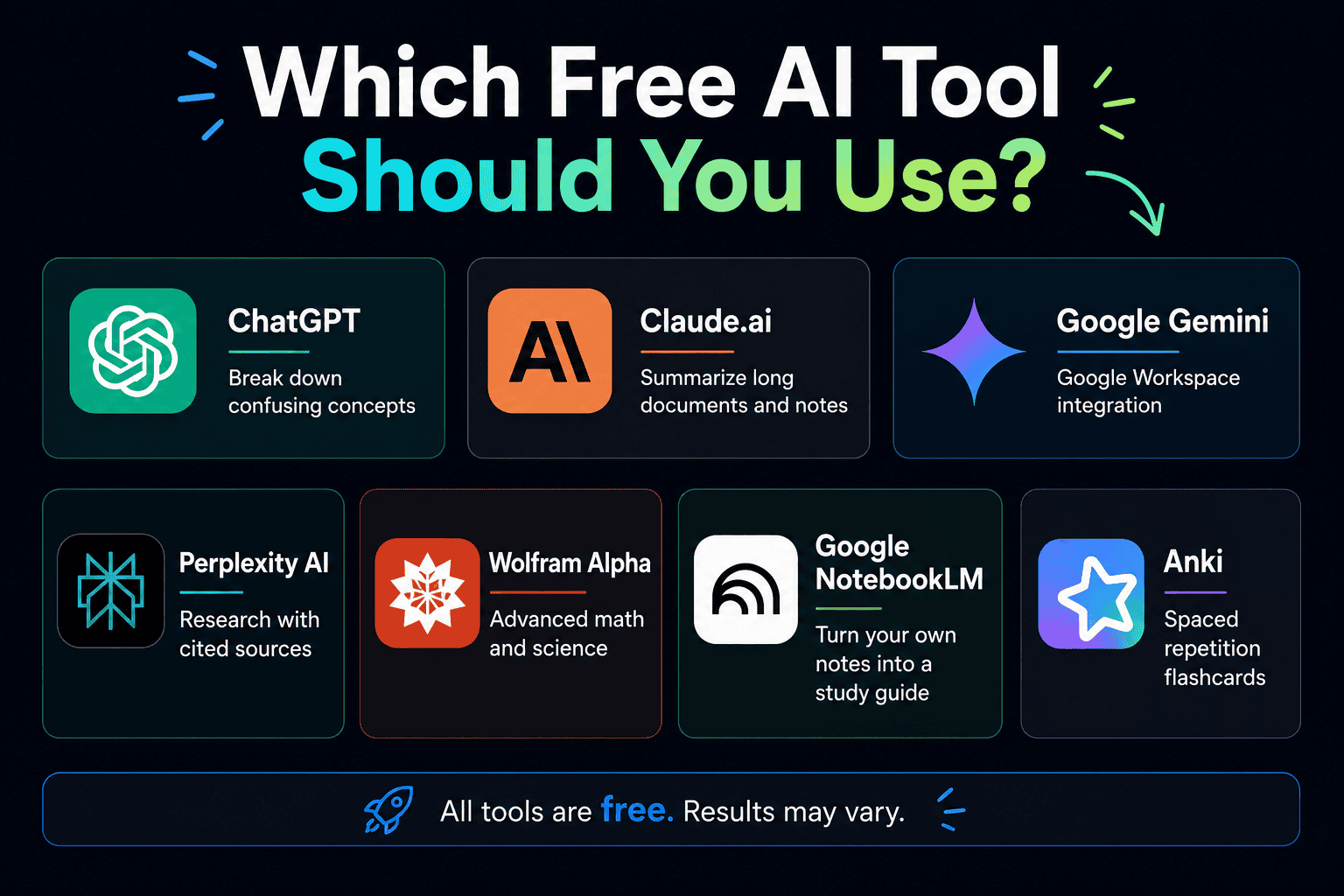
ChatGPT (Free Tier) is the strongest starting point for breaking down confusing concepts. Ask it to explain photosynthesis like you are 12, or give you a simple analogy for how supply and demand works. The free version responds well to specific, focused questions.
Claude.ai (Free Tier) handles long material better than most. Upload a textbook chapter or paste in dense lecture notes and ask it to identify the five most important points you need to know for the test. It supports PDF uploads on the free tier and holds more context at once, which makes it more useful for dense subject matter.
Google Gemini earns its place if your school already runs on Google Workspace. It connects directly to your Google Docs and Slides, so you can outline a presentation or clean up a rough draft without switching windows or copying and pasting between tabs.
The Rotation Strategy
Each of these tools has a daily usage limit on the free tier. The workaround costs nothing: start with one, work through it until you hit the limit, then switch to the next. Three free accounts gives you far more runway than any single paid subscription.
The Anti-Hallucination Research Tool
There is one serious problem with using AI for research. ChatGPT will state incorrect information with exactly the same confidence it uses for correct information. Submitting a paper built on a made-up source or statistic is a fast way to lose marks you cannot afford to lose.
Perplexity AI is the fix for research-based tasks. It works like a search engine that explains itself, and it cites its sources inline so you can verify before you use anything. For research papers, history assignments, or any task where accuracy matters, it is the more reliable choice.
Always click the source links before copying anything into your work. The citation appearing on screen does not mean the source says what the AI claims it says. Checking takes 30 seconds and could save a grade.
Mastering Math and Science Without a Tutor
Most students get stuck on math and science not because the concepts are impossible, but because textbooks skip the explanation of why each step works the way it does.
Photomath and Microsoft Math Solver both let you point your phone camera at an equation and get a full solution breakdown. The value is not the answer itself but seeing every step explained in plain language so you understand the method. Both apps are free.
Wolfram Alpha covers advanced calculus, chemistry, and physics problems that go beyond what most phone apps can handle. The free version handles a wide range of inputs and is worth bookmarking for any STEM course where you need to verify your working or explore a concept further.
The Active Recall Hack: AI-Generated Flashcards
Active recall is one of the most well-supported study methods available. Testing yourself on material rather than re-reading it produces stronger retention, and the research on this has been consistent for decades. The problem is that building a quality flashcard deck by hand takes longer than most students have on a school night.
Here is the shortcut. Paste your class notes into ChatGPT or Claude and ask it to create 20 practice questions and answers based on those notes in CSV format for Anki. The AI produces a ready-to-import file in under a minute.
Anki is the free desktop flashcard app that uses spaced repetition to schedule reviews at the moment you are most likely to forget the material. Import the CSV file from the AI, and what used to take two hours of manual card creation becomes two minutes of setup.
Turn Your Notes Into a Personal Study Guide: Google NotebookLM
Google NotebookLM is completely free with any Google account, no credit card and no time limit. You upload your own materials (textbook chapters, lecture notes, PDFs, or slides) and it becomes a study assistant that knows only your content.
Ask it to summarize a chapter, generate a study guide from your notes, or create a list of likely exam questions based on what you uploaded. Unlike general AI chatbots, it draws only from what you give it, which means the answers are grounded in your actual course material rather than the internet at large.
It also generates audio overviews, a podcast-style summary of your uploaded content that you can listen to while commuting or doing something low-focus. It is one of the most genuinely useful free tools a student can have going into exam season.
The Real Work Still Falls on You
A calculator does not make you a mathematician, and AI does not make you a scholar. These tools remove the time-consuming parts of studying so you can put your energy toward the part that actually matters, which is understanding the material well enough to use it.
The students who get the most from these tools are not using them to avoid thinking. They are using them to clear the setup work out of the way faster so they have more time and mental energy left for the hard thinking.
Before you dive in, it is worth reading our guide on how to use AI for school without cheating so you know exactly where the line is. Using AI to study smarter is a skill. Using it to shortcut the thinking is the mistake that follows you into the exam room.
Frequently Asked Questions
Are free AI study tools actually good enough, or do you need to pay?
For most high school and early university work, the free tiers are more than sufficient. ChatGPT, Claude, and Gemini all offer capable free versions, and tools like Perplexity, Anki, and Google NotebookLM are fully free without meaningful paywalls on their core features. Every tool on this list costs $0.
What is the best free AI tool for writing a research paper?
Perplexity AI is the strongest starting point because it cites its sources inline, which lets you verify information before it goes into your paper. For drafting and outlining, Claude handles long-form writing well and works with documents you paste directly into the chat. Always verify any fact an AI provides before using it in submitted work.
How do I make AI-generated flashcards for Anki?
Paste your class notes into ChatGPT or Claude and ask it to generate 20 question-and-answer pairs in CSV format for Anki. Copy the output, save it as a .csv file, and import it into the free Anki desktop app. The full process takes about two minutes per topic, and the resulting deck is ready to study immediately.
If you are curious about earning money with these same tools, the guide on how to make money with AI as a teen covers six income paths that use the same AI toolset you are already learning.
This article is for informational purposes only. Tool availability, free tier limits, and features may change. Always verify current terms directly with each platform before relying on them for your studies.
Want more tools and strategies that actually work for student life? Subscribe to the TeenLearner newsletter and get one practical lesson delivered to your inbox each week.
Robert Puharich is the founder of TeenLearner, where he helps teens build real-world skills in money, AI, and life. With over 20 years in education and a Master of Education (M.Ed.) from UBC, he created TeenLearner to teach practical skills such as financial literacy, making better life choices, and the wise use of technology. Robert is also a published author and business founder.