
Most teens who have heard of AI tools have heard of ChatGPT. Claude is different, and once you understand how, you will know exactly when to use it and why it often gives you better results for the things students actually spend their time on.
Claude is made by Anthropic, a company built specifically around AI safety research. That background shapes how the tool behaves: it is more likely to push back on a weak argument, flag something it is uncertain about, and give you genuinely critical feedback instead of just agreeing with what you said.
This guide covers everything you need: what Claude is, how to set it up, what it does better than other AI tools, and where it falls short. If you are already using ChatGPT, the comparison section alone is worth reading.
What Claude Actually Is (and Why It Feels Different)
Claude is a large language model built by Anthropic. Like ChatGPT, it was trained on a massive amount of text and learned to generate useful responses. The core technology is similar, but the behavior is noticeably different in practice.
The most significant difference is honesty. Claude is more likely to tell you when it disagrees with you, when your essay argument is weak, or when it is not confident about a fact. Most AI tools default to agreement and encouragement. Claude defaults to accuracy, even when that means giving you an answer you did not want.
The second difference is depth. Claude handles long, complex material better than most tools. You can paste in an entire research paper, a chapter from a textbook, or a long essay draft and Claude will engage with the full content rather than summarizing it into generalities.
How to Set Up Claude as a Teen
Go to claude.ai and create a free account with your email or Google login. You need to be at least 13 years old per Anthropic’s terms. No credit card is required and the free plan does not expire.
The free plan runs on Claude Sonnet 4.6 and includes Projects, Artifacts, memory, web search, and file uploads. You will hit message limits during heavy use, roughly 15 to 40 messages every five hours depending on the type of work. For most students, the free plan handles a full week of studying, writing feedback, and research without hitting the ceiling.
Claude Pro costs $24 CAD per month and removes message limits while giving access to more powerful models for harder problems. It is worth considering if you use Claude heavily for essays, research, and complex coursework. It is not necessary to start.
If your school is a post-secondary institution, check whether it participates in Anthropic’s Claude for Education program. Launched in April 2025, it gives students at partner schools free access to Claude’s premium features through their institution.
Being open with your parents and teachers about how you are using Claude is a good habit. The uses in this guide are things any educator would be comfortable seeing a student do.
For School: Where Claude Has the Edge
Claude is not the strongest tool for every school subject, but for writing-heavy work it is the best free AI tool available to students right now. Essays, history responses, English analysis, and any assignment where argument quality matters are where Claude consistently outperforms other tools.
The reason is feedback quality. When you show Claude your work, it does not just say “great job.” It tells you specifically what is weak, what is unclear, and what a teacher is likely to push back on. That level of honest critique is hard to get from a tool that is designed to be encouraging.
For AI use guidelines, the rules still apply. Before using Claude for any assignment, check what your teacher allows. TeenLearner’s guide on how to use AI for school without cheating covers what counts as legitimate use in detail.
For Writing: The Honest Feedback Tool
This is where Claude earns its reputation. Give it a paragraph you wrote and ask for real feedback, and it will identify exactly where your argument loses clarity, where your evidence is thin, and where your sentence structure works against you.
The key is to ask for honesty directly. Tell Claude not to soften its feedback. A prompt like “Read this paragraph and tell me what is actually weak about it, not what is good” will get you far more useful information than a general “can you improve this.”
Getting specific essay feedback:
“Read this paragraph from my [subject] essay. Tell me: where does my argument lose the reader, where is my evidence thin, and what would a skeptical teacher push back on? Do not rewrite it. Just tell me what to fix.”
Improving a draft without losing your voice:
“Rewrite this paragraph to be clearer and more direct. Keep my original argument and examples. Show me every change you made and explain why.”
Checking your thesis before you write:
“My essay thesis is [paste it]. Tell me the two strongest counterarguments against it and what evidence I would need to address them.”
Claude does not just rewrite your work. It teaches you what is wrong with it, which is a much more useful skill to build.
For Research: Upload Documents and Ask Questions
One of Claude’s most useful features for students is document upload. You can paste in a research paper, a chapter from a textbook, or a long article, and ask Claude to help you work with it directly.
This is different from asking ChatGPT to explain a topic. You are bringing the actual source material into the conversation and asking Claude to engage with it specifically. That means you get answers grounded in the document you are studying, not generic summaries.
Working with a text you have to read:
Upload the article or paste the key section, then ask: “Summarize the main argument in this text in three sentences. Then tell me the two points the author uses to support it and one thing they do not address.”
Finding what matters before a test:
“I have to know this chapter for an exam. What are the five most important concepts, and what question would a teacher most likely ask about each one?”
Checking your understanding of a source:
“I am going to explain what I think this article argues. Tell me if I have understood it correctly and where I am off: [your explanation].”
Document upload works on the free plan. It changes how you do research because you stop searching for information and start working directly with it.
Claude Vs ChatGPT Vs Perplexity Vs Gemini Vs Copilot: The Full Comparison
Most serious students in 2026 end up using several of these tools, because they are genuinely better at different things. Here is the honest breakdown.
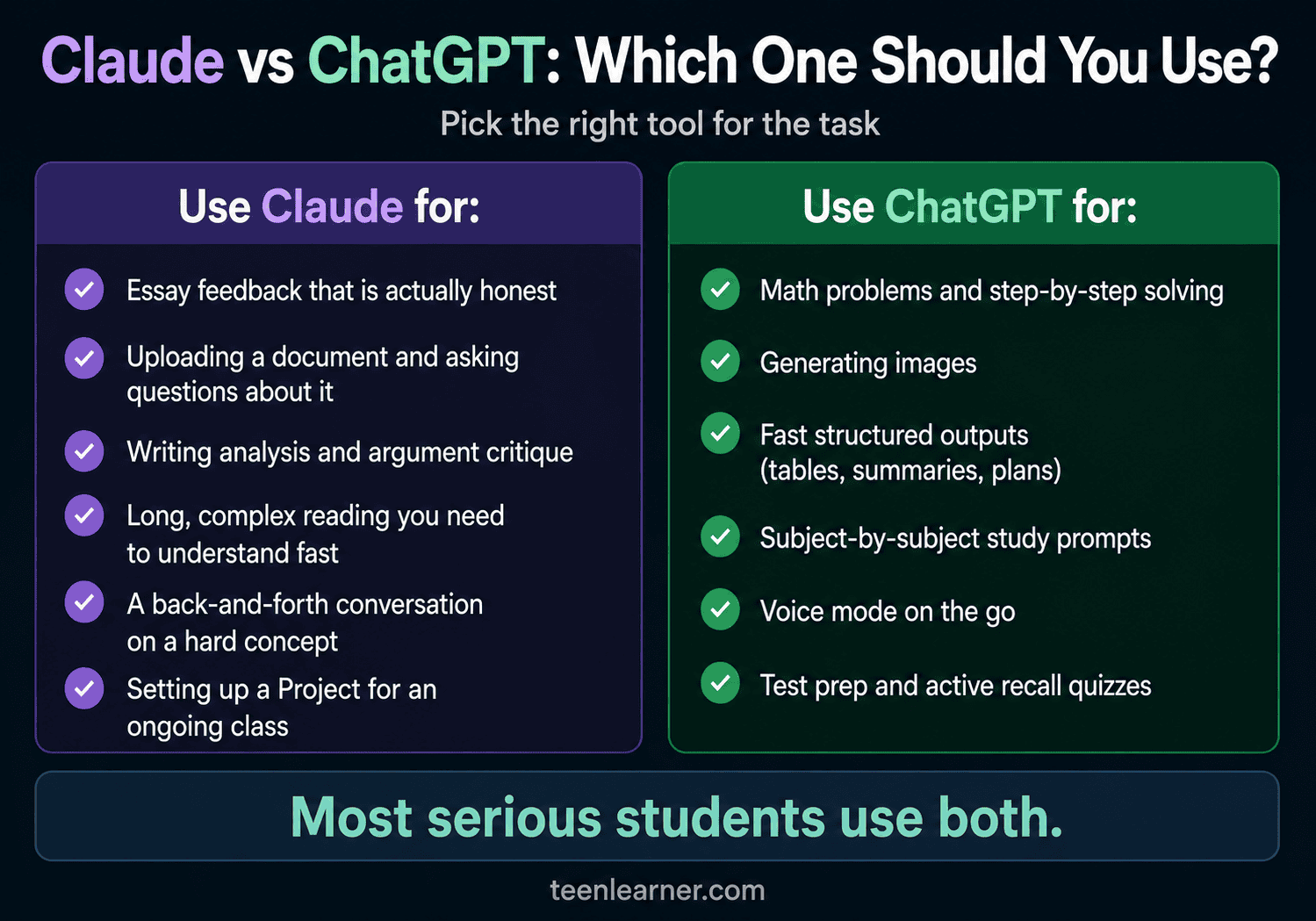
Use Claude when:
You are writing an essay and need real feedback. You are reading a complex document and want to ask questions about it. You need an explanation of something nuanced and want a thoughtful back-and-forth conversation. You want a tool that will push back when your thinking is weak.
Use ChatGPT when:
You need math help or step-by-step problem solving. You want to generate an image. You need fast, structured outputs like comparison tables or study summaries. You want voice mode for on-the-go studying.
Use Perplexity when:
You need sources you can verify, or you are researching something time-sensitive that requires current information from the open web. For a full breakdown, see the TeenLearner Perplexity guide for teens.
Use Gemini when:
You want an assistant already built into your Android phone or Google account, or you need to quickly generate or edit an image. For a full breakdown, see the TeenLearner Gemini guide for teens.
Use Copilot when:
You are on a Windows PC and want AI already sitting in your taskbar and Microsoft 365 apps, especially if a parent wants real controls over how you use it. For a full breakdown, see the TeenLearner Copilot guide for teens.
And when the job is studying only from your own uploaded notes with nothing else mixed in, that is a sixth, more specific tool. See the TeenLearner Gemini Notebook guide for teens for that one.
The short version: Claude is the thinking and writing tool. ChatGPT is the general-purpose doing and output tool, covered in the TeenLearner ChatGPT guide for teens. Perplexity finds and verifies sources. Gemini and Copilot are whichever one is already built into the device you are using.
No single tool is better across the board. The students who get the most out of AI in 2026 know which one to open depending on the task.
Where Claude Gets It Wrong
Claude is not reliable for everything, and knowing the limits matters as much as knowing the strengths.
It still makes things up. Hallucination happens in Claude just like every other AI model. It will occasionally cite a study that does not exist or state a fact with confidence that turns out to be wrong. Never copy a statistic or quote from Claude into an assignment without verifying it first.
It can be wordy. Claude sometimes gives you more than you need. If you want a short, direct answer, tell it explicitly: “Keep your response under 100 words” or “Give me the short version first.”
It does not always search the web automatically. Claude has web search capability, but it does not use it for every question. For anything time-sensitive or current, tell it to search the web before answering, or you may get information from its training data that is out of date.
Memory has limits. Even with persistent memory, Claude cannot remember everything from every past conversation. For any important project, start the session by giving it the context it needs: who you are, what you are working on, and what you need from this session.
The One Feature That Changes Everything: Projects
Projects are Claude’s most underused feature, especially for students. A Project is a dedicated workspace where you can upload documents, set ongoing instructions, and have Claude remember your context across every conversation inside it.
Here is what that looks like in practice. Create a Project for a class you are taking. Upload your syllabus, your assignment rubric, and your notes. Set an instruction like: “I am a Grade 11 student in Canada. Always explain things at that level. My essay style tends to be too wordy. Flag that when you see it.” Every conversation you have inside that Project starts with all of that context already loaded.
Setting up a class Project:
Create a new Project in Claude. Name it after the class. Upload the syllabus and any assignment sheets. Add a short instruction about your grade level, what subject it is, and what you need Claude to know about your writing. Every session inside that Project builds on what came before.
Projects are available on the free plan. They turn Claude from a generic chatbot into something that actually knows your specific situation, which is when it becomes genuinely useful rather than just occasionally helpful.
Your Starting Point
Claude is not trying to do everything. It is trying to do a specific set of things exceptionally well: help you think more clearly, write more effectively, and engage with complex material more deeply. Those happen to be the things that matter most in school.
The students who get the most out of Claude are the ones who treat it like a demanding study partner, not a shortcut. Ask it to push back. Ask it to find the weakness. Ask it to explain why, not just what.
Pick one section from this guide that applies to what you are working on right now. Upload a document you have been struggling with, or paste in a paragraph from your next essay. See what happens when the feedback is actually honest.
Frequently Asked Questions
Is Claude free for teens?
Yes. The free plan at claude.ai requires only an email address, has no trial expiry, and runs on Claude Sonnet 4.6. It includes Projects, document upload, memory, and web search. You will hit message limits during heavy use, but for most students the free plan covers a full week of studying, writing feedback, and research without running out.
How is Claude different from ChatGPT?
Claude is generally stronger for writing feedback, essay analysis, and working with long documents. ChatGPT is generally stronger for math, image generation, and fast structured outputs. Claude is more likely to push back and give you honest criticism rather than just agreeing with you. Most students who use AI seriously end up using both, depending on what the task requires.
What should I never use Claude for?
Do not submit anything Claude writes as your own original work without disclosure and your teacher’s approval. Do not use it as a primary source for facts, statistics, or quotes without verifying them independently. Do not use it to replace conversations with teachers, counselors, or other people who actually know your situation. Claude is a thinking tool, not a replacement for judgment or the people around you.
This article is for informational purposes only. Claude and AI tools change frequently. Features, pricing, and policies described here reflect what is available as of August 2026 and may have changed. Always check claude.ai for the most current information.
Want more practical guides on AI, money, and the skills that actually matter? Subscribe to the TeenLearner newsletter and get one lesson delivered to your inbox each week.