
ChatGPT is one of the most powerful learning and productivity tools available to students right now, and most teens are using only a fraction of what it can do. According to College Board research, 84% of US high school students were using generative AI for schoolwork by May 2025. But using it for homework is just the beginning.
Teens are using ChatGPT to study more effectively, explore careers, build side businesses, develop creative projects, and think through decisions. The challenge is that nobody has taught most students how to actually use it well.
This guide covers the full picture: what ChatGPT is, how to set it up responsibly, what it is genuinely good for, and where it falls short. Start with the section that is most relevant to you right now.
What ChatGPT Actually Is (and What It Is Not)
ChatGPT is a large language model. That means it was trained on a massive amount of text and learned to predict what a useful response looks like. It can search the web when you ask it to, but it does not automatically look things up for every question, and it does not actually think the way a person does.
What it does well is remarkable. It can explain almost any concept in plain language, give you detailed feedback on something you wrote, help you think through a problem, generate ideas faster than any brainstorm, and adapt its tone to whatever you need.
What it cannot do is equally important to understand. It makes things up with total confidence. It agrees with you when it should push back. Its memory of you is limited on the free plan, so tell it who you are at the start of every important conversation. Knowing both sides of this makes you a much better user.
How to Set Up ChatGPT as a Teen
Go to chatgpt.com and create an account. You need to be at least 13 years old per OpenAI’s terms. If you are under 18, you need a parent or guardian’s permission. If your parents have questions about ChatGPT, sharing this guide with them is a good starting point for that conversation.
The free plan is genuinely good. The free tier handles the vast majority of studying, writing, brainstorming, and creative work without costing anything. Everyday text chats are unlimited, while file uploads, images, and voice have their own limits. For most teens the free plan is more than enough to start.
ChatGPT Plus is a paid plan (the price shows at checkout) and gives you more usage, access to more powerful models for harder problems, and persistent memory across conversations. It is worth it if you use ChatGPT daily for school and other projects. It is not necessary if you are just getting started.
Using it responsibly: OpenAI launched parental controls in 2025 that let parents set safe usage settings including quiet hours, voice mode, and image generation controls. Being open with your parents or teachers about how you are using ChatGPT is a good habit. Most of the uses in this guide are things any educator would be proud to see a student doing. Since August 2026, ChatGPT for Teens also applies automatically to accounts OpenAI believes belong to someone under 18, and it adds features like break reminders. Parents can also read our parent’s guide to teens and AI.
For School: Study Smarter, Not Faster
The most common use is homework help, and most students are using it badly. Copying an answer and submitting it is both academically dishonest and a waste of a genuinely useful tool.
The students who get real value from ChatGPT use it to understand what they do not understand, get feedback on work they already did, and practice before a test. Every one of those uses makes you better at the subject. Copying does not.
For a full breakdown of what counts as fair use versus cheating, plus subject-by-subject prompts you can copy, read the TeenLearner guide on how to use AI for school without cheating. For specific prompts by subject (math, science, essays, history, and test prep), see the ChatGPT for studying guide.
For Money: What Teens Are Actually Building
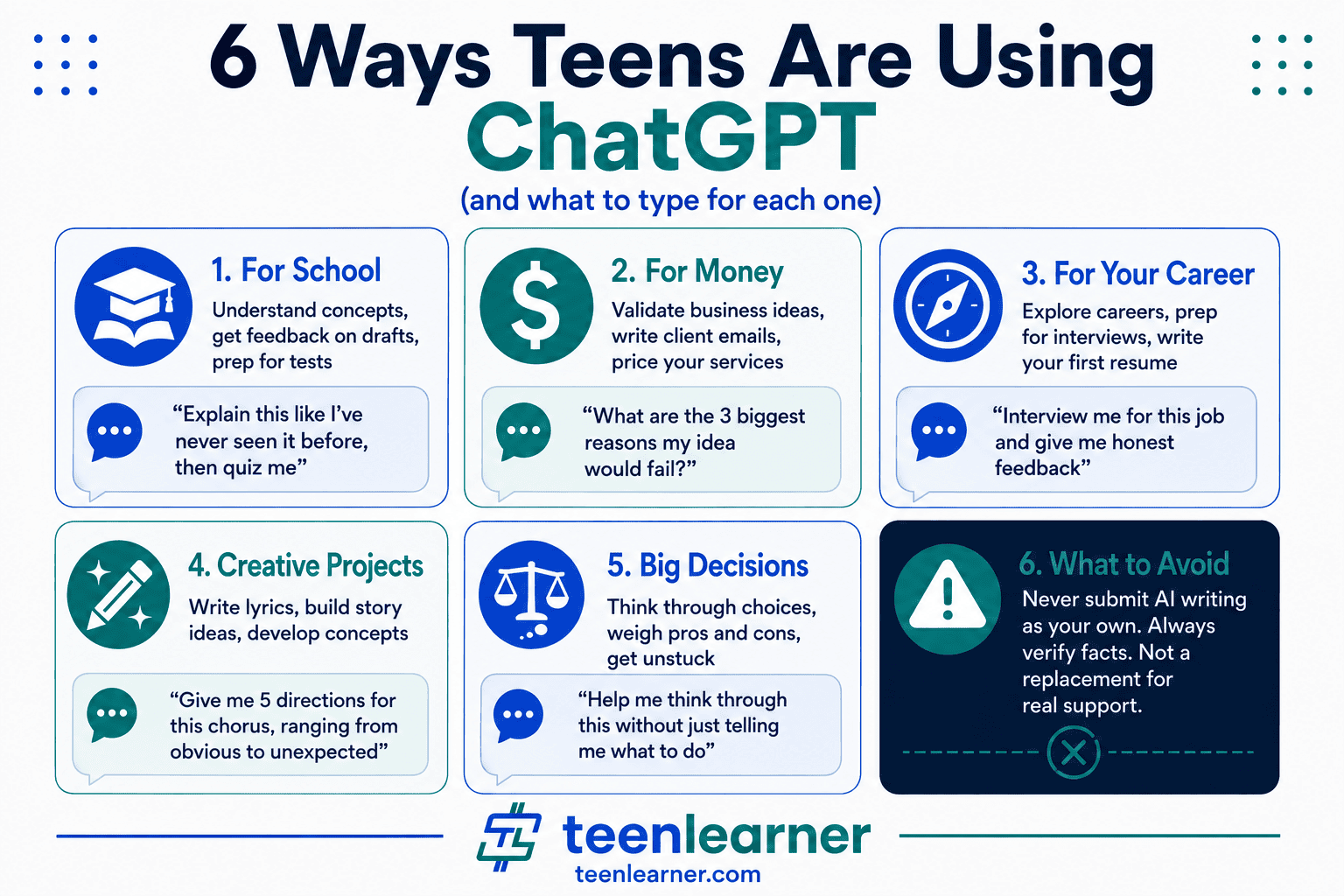
This is where ChatGPT stops being a school tool and starts being something more interesting. Teens are using it to run real businesses, and the ones doing it well are treating ChatGPT as a business partner, not a shortcut.
Here is what that looks like in practice.
Validating an idea before you waste time on it:
“I want to start a [business idea] targeting [specific customer]. What are the three biggest reasons this would fail? Be honest.”
Writing content for a side hustle:
If you do social media management, graphic design, or create content for local businesses, ChatGPT can help you write captions, emails, service descriptions, and proposals in a fraction of the time. You still need to review and edit everything, but the starting point is already there.
Building a professional bio at any age:
“I am 17, I do [skill]. Help me write a one-paragraph bio that sounds professional without overselling. Keep it honest.”
Pricing and positioning:
“I charge $[X] per hour for [service]. Here is my competition: [describe]. Am I pricing too low, too high, or about right? What would you change?”
ChatGPT is not a business plan generator. It is a thinking partner that helps you move faster and catch mistakes before they cost you. For specific ways teens are making money with AI, the TeenLearner guide on how to make money with AI as a teen goes deep on what is actually working.
For Your Future: Career Clarity and Skill Building
Most career advice for teens is vague. ChatGPT lets you get specific in a way that a school guidance counselor with 400 students does not have time for.
Exploring careers you are actually curious about:
“I am interested in [field]. What does a day-to-day work week actually look like for someone five years into this career? Include what most people find harder than expected.”
Skills that will still matter when AI changes the job market:
“I want to work in [industry] in the next five years. What three skills should I be building right now that will still matter when AI has changed the job market?”
First resume with no experience:
“I am 16 and applying for my first job at [type of place]. I have [volunteer work, school activities, any relevant skills]. Write me a resume that is honest but presents this well.”
Interview practice that actually helps:
“Interview me for a [role] position. Ask me five questions, wait for my answers, then give me honest feedback on each response.”
The key with career prompts is to ask for honesty. ChatGPT defaults to encouragement. If you want genuinely useful feedback, tell it to skip the positive framing and tell you what is actually weak.
For Creative Projects
ChatGPT is an excellent creative partner when you are the one with the vision and you use it to fill gaps rather than replace your ideas.
Music and lyrics: Tell ChatGPT the feeling you are going for, the genre, and a few lines you already have. Ask it to give you three different directions for the chorus. Pick what resonates and rewrite it in your voice.
Stories and scripts: Use it to get unstuck. “I am writing a story where [setup]. My character needs to make a decision that reveals something about who they are. Give me five options for what they could do, ranging from the obvious choice to something unexpected.”
Art and design concepts: “I want to create a [type of piece] that communicates [feeling or idea]. Give me five visual concepts with specific descriptions I could sketch or brief to someone.”
Game ideas, app concepts, and passion projects: “Here is my idea: [describe]. What is the weakest part of this concept? What would make someone who heard this say that is actually interesting?”
Creative prompts work best when you treat ChatGPT as a collaborator who knows a lot about craft but nothing about your specific vision. You supply the vision. It supplies the options.
For Personal Decisions: Useful, With Real Limits
A 2025 Common Sense Media study found that 72% of teens have used AI companions at least once, with many turning to them for advice, decision-making, and emotional support. This is one of the most common things teens do with ChatGPT that nobody talks about openly.
ChatGPT can help you think through a decision, organize your thoughts when you are overwhelmed, or process a situation by writing it out. For that kind of reflective thinking, it can be genuinely useful.
“I am trying to decide between [option A] and [option B]. Here are the factors that matter to me: [list them]. Help me think through this without just telling me what to do.”
“I feel [emotion] about [situation]. Help me understand what I am actually reacting to.”
Where it gets complicated: ChatGPT has a tendency to validate what you say and soften hard truths. For real emotional struggles, a school counselor, a trusted adult, or a mental health professional gives you something ChatGPT cannot: someone who actually knows you and cares about the outcome. Use it to think, not to replace the people in your life.
ChatGPT Vs Claude Vs Perplexity Vs Gemini Vs Copilot: The Full Comparison
ChatGPT is usually the first AI tool a teen tries, but it is not the only one worth knowing. Five other tools covered on this site are each genuinely better at specific things, and knowing which one to open is a real skill.
Use ChatGPT when:
You want the single most capable general-purpose model, generous free usage limits, and the widest range of custom GPTs for a specific task.
Use Claude when (18+ only):
You need honest, critical feedback on an essay draft, not just a quick productivity assist. For a full breakdown, see the TeenLearner Claude guide for teens.
Use Perplexity when:
You are researching something and need real, checkable citations rather than a confident-sounding answer. For a full breakdown, see the TeenLearner Perplexity guide for teens.
Use Gemini when:
You are on an Android phone or already inside Google Search and Gmail, and want an assistant that is already there instead of a separate destination. For a full breakdown, see the TeenLearner Gemini guide for teens.
Use Copilot when:
You are on a Windows PC and want AI built directly into your taskbar and Microsoft 365 apps, especially if a parent wants real, adjustable controls over how you use it. For a full breakdown, see the TeenLearner Copilot guide for teens.
And when the job is studying only from your own uploaded notes with nothing else mixed in, that is a sixth, more specific tool. See the TeenLearner Gemini Notebook guide for teens for that one.
No single tool wins across the board. The students who get the most out of AI in 2026 are not loyal to one app. They know which one to open.
Where ChatGPT Gets It Wrong
This is the section most guides skip, which is exactly why it matters.
It makes things up. This is called hallucination, and it happens across every AI model. ChatGPT will cite a study that does not exist, quote a person who never said that, and state a wrong date with total confidence. Never copy a fact, statistic, or quote from ChatGPT into an assignment without verifying it first.
It agrees with you too much. If you give ChatGPT your essay thesis and ask if it is strong, it will probably say yes. Ask it specifically to find the flaws and the counterarguments, or you will get feedback that is more encouraging than honest.
It does not always search the web. ChatGPT can browse the internet, but it does not do it automatically for every question. If you ask about current events, prices, or anything time-sensitive, tell it to search the web first, or it may answer from its training data and give you outdated information.
It forgets a lot. On the free plan, memory is limited, so a new conversation may not know what you told it last week. ChatGPT does not remember that you are in Grade 11 or anything you told it last week. Start every important session with a short context line: who you are, what you are working on, and what you need.
It sounds confident even when it is wrong. This is the most important thing to understand. The confident tone is not a reliability signal. It is just how the model writes.
The One Skill That Makes Everything Else Better
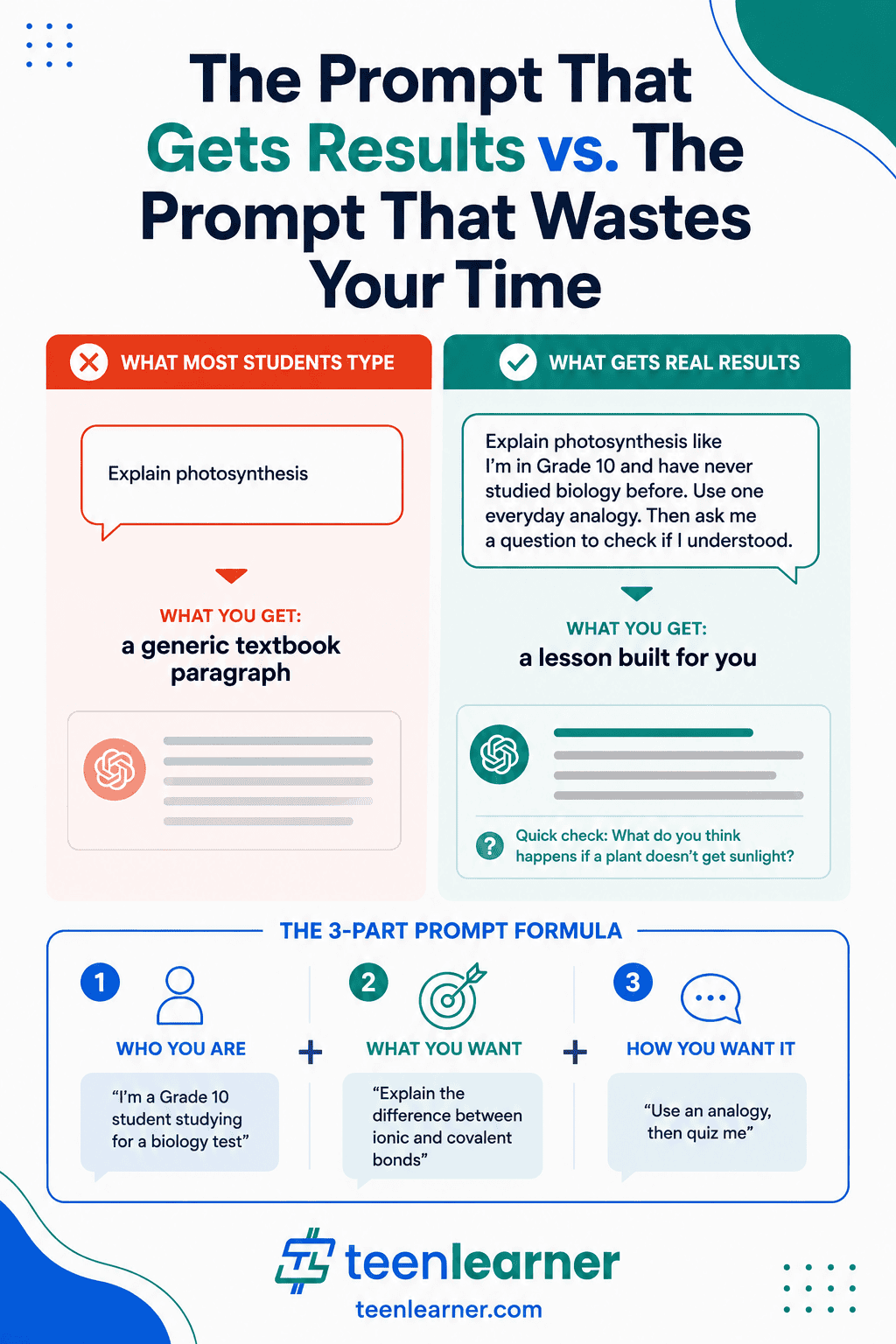
Every result you get from ChatGPT depends on what you give it. Most people give it too little context and get generic responses, then assume ChatGPT is not that useful.
Before any prompt, give it three pieces of information. Who you are: “I am a Grade 10 student in Canada studying for a chemistry test.” What you want: “I need to understand the difference between ionic and covalent bonds.” How you want it: “Explain it using a real-world analogy, then ask me a question to check if I understood.”
Three lines of context turns a generic explanation into something that actually fits your situation. Practice this on every prompt and your results will be noticeably better within a few conversations.
Your Starting Point
ChatGPT is one of the most genuinely useful tools available to you right now, and it is free. The teens who get the most out of it are not the ones who use it most, they are the ones who use it most intentionally: asking it to teach instead of answer, challenge instead of confirm, and help them think instead of think for them.
Pick one section from this guide that applies to your life right now. Try the prompts. See what happens when you give it more context than you think it needs. The learning curve is short, and the skill transfers to every AI tool that comes after this one.
Frequently Asked Questions
Is ChatGPT free for teens?
Yes. The free plan at chatgpt.com is available to anyone 13 and older (under 18, you need a parent’s permission). It covers most studying, writing, brainstorming, and creative uses without any cost. Some features, like uploads and images, have limits, and ChatGPT Plus (a paid plan) gives you more usage and features, but the free plan is a genuinely good starting point for most teens.
How do ChatGPT’s parental controls work?
OpenAI’s parental controls let a parent link their account to a teen’s account and set usage preferences like quiet hours, voice mode settings, and image generation controls. Parents can receive safety notifications for serious account-level events. The controls are designed to support responsible use. If your parents want to set these up, OpenAI’s help centre walks through the process step by step.
What should I never use ChatGPT for?
Do not submit anything ChatGPT writes as your own original work without your teacher’s approval. Do not use it as your only source for facts, statistics, or quotes, as you always need to verify before repeating something. Do not rely on it for medical, legal, or mental health decisions that need professional guidance. And do not use it to make important life decisions without talking to a real person who knows your situation. ChatGPT is a thinking tool, not a replacement for judgment or the people in your life.
This article is for informational purposes only. ChatGPT and AI tools change frequently. Features, pricing, and policies described here reflect what is available as of August 2026 and may have changed. Always check openai.com for the most current information.
Want more practical guides on AI, money, and the skills that actually matter? Subscribe to the TeenLearner newsletter and get one lesson delivered to your inbox each week.