

Most students who use ChatGPT for studying use it the same way they use Google: type a question, get an answer, close the tab. That gets you through tonight’s homework. It does not help you on the test on Friday.
The gap between a useful study session and a waste of time almost entirely comes down to what you type. A vague question gets a generic paragraph. A specific, well-structured prompt turns ChatGPT into something that actually teaches you.
This guide covers exactly what to type, by subject, so you can use ChatGPT to study without replacing your thinking with it.
ChatGPT Study Mode: The Feature Most Students Have Never Tried
You need to be 13 to use ChatGPT, and under 18 you need a parent’s permission; see our ChatGPT guide for teens.
In July 2025, OpenAI launched Study Mode, a free learning feature built specifically for students. Instead of giving you answers, it asks you questions, offers hints, and guides you through problems step by step using Socratic questioning. It was developed with pedagogy experts from over 40 institutions.
To use it, open ChatGPT, click the plus icon near the text box, and select “Study and learn.” You can also go directly to chatgpt.com/studymode. The feature is free for all users, including the free plan.
Study Mode changes how ChatGPT responds. It calibrates to your skill level, checks your understanding before moving forward, and gives feedback on your answers instead of just producing text for you to read. For any subject where you want to actually learn the material, this is the right place to start.
Before You Start: Check Your School’s Policy
Rules on AI use vary by school, class, and assignment type. Before using any of the prompts below, check what your teacher allows. TeenLearner’s guide on how to use AI for school without cheating covers what counts as legitimate use versus academic dishonesty.
The prompts in this guide are all designed to make you think, not to do the thinking for you. Every one of them is something an educator would be fine seeing a student use.
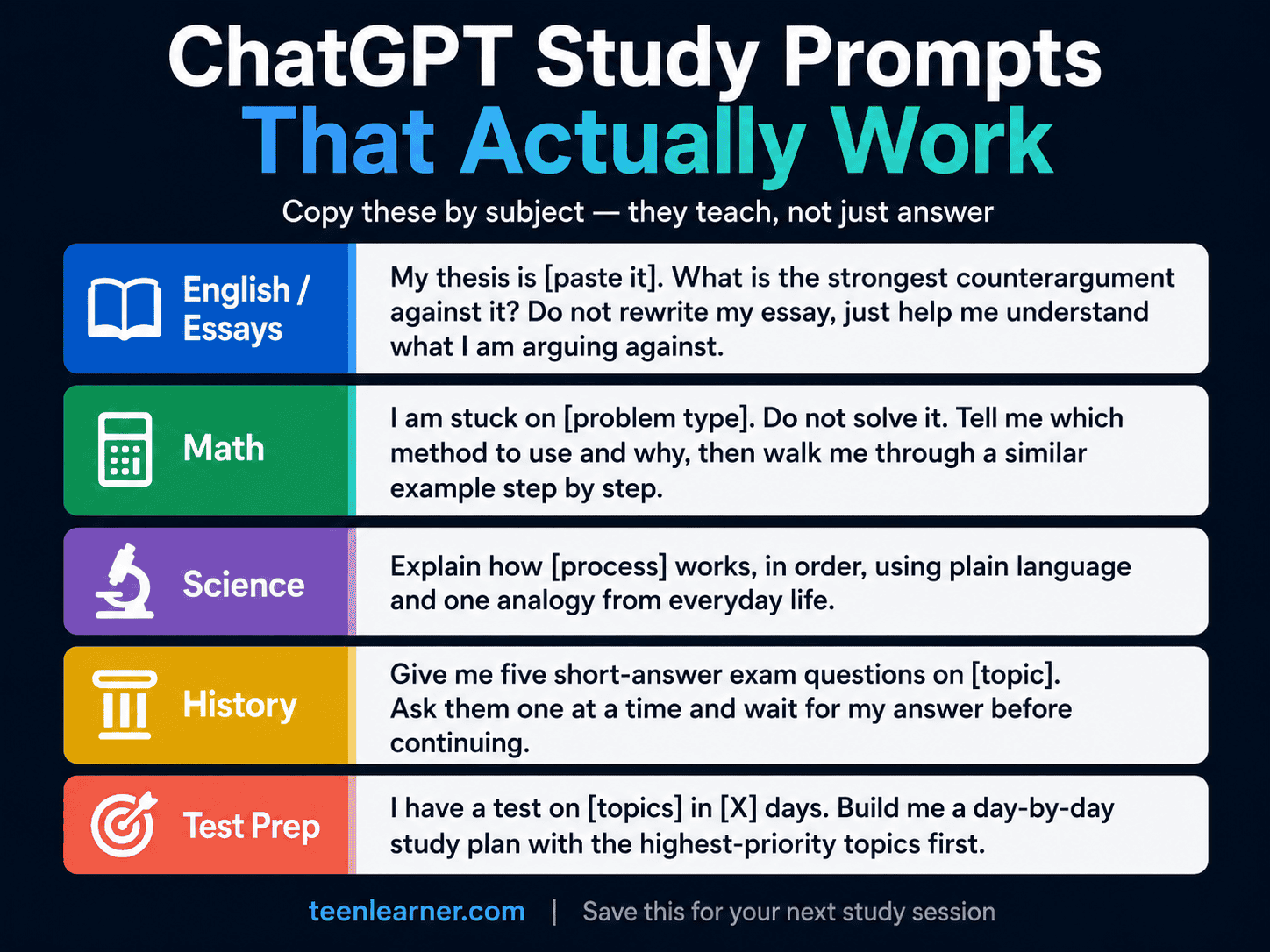
English and Essay Writing
The most common mistake is asking ChatGPT to write the essay. That skips the thinking that produces actual learning, and the result usually sounds like it was written by an algorithm, because it was.
These prompts use ChatGPT as a thinking partner, not a ghostwriter.
Finding angles you have not considered:
“I need to write a [length] essay on [topic] for [grade level]. Give me five argument angles that most students probably will not choose.”
Stress-testing your thesis:
“My essay thesis is [paste your thesis]. What is the strongest counterargument someone could make against it? Do not write my response. Just help me understand what I am arguing against.”
Getting feedback on what you already wrote:
“Read this paragraph I wrote and tell me: where is my argument unclear, where am I repeating myself, and where does my evidence feel weak? [paste paragraph]”
Improving clarity without losing your voice:
“Rewrite this paragraph to be clearer and more direct, but keep my original argument and examples. Show me what changed and why. [paste paragraph]”
The rule stays constant: you write the essay. ChatGPT sharpens what you produce.
Math
The worst thing you can do in math is ask ChatGPT to solve the problem for you. You get the answer with no understanding, and the next similar problem on the test will expose exactly that gap.
These prompts get you unstuck without handing you the answer.
When you do not know where to start:
“I am stuck on this type of problem: [describe or paste]. Do not solve it. Tell me which method I should use and why, then walk me through a similar example step by step.”
When you got the wrong answer:
“I attempted this problem and got [your answer], but the correct answer is [correct answer]. What step did I most likely make a mistake on? Help me find where my logic broke down, not just the right answer.”
When you do not understand a concept:
“Explain [concept] like I have never taken this class before. Use a real-world example that a 16-year-old would relate to. Then give me one practice problem and wait for my answer before you continue.”
That last prompt is especially effective inside Study Mode. It turns into a full tutoring session where ChatGPT keeps testing your understanding before moving on.
Science
Science has two problems: dense terminology and processes that are hard to visualize. ChatGPT handles both well when you prompt for it directly.
Understanding a process in order:
“Explain how [process] works, step by step, as if you are walking me through it in the order it happens. Use plain language and one analogy from everyday life.”
Memorizing terms and vocabulary:
“I need to memorize these terms for a test: [paste list]. Create a comparison table with three columns: the term, a simple definition, and one real-world example.”
Finding what you might be confusing:
“I am studying [topic]. What are the most common misconceptions students have about this? I want to make sure I am not misunderstanding anything before my test.”
Making a concept actually stick:
“Give me three different analogies for [concept]: one funny, one related to sports or food, and one from technology. I want options for which one actually sticks.”
History and Social Studies
History exams rarely ask you to memorize dates alone. They ask you to analyze causes, explain perspectives, and build arguments. These prompts build that skill.
Understanding causes from multiple perspectives:
“Explain the causes of [event] from three different perspectives: [group 1], [group 2], and [group 3]. Keep each one under 100 words and use plain language.”
Building an argument:
“I have to write a short-answer response arguing that [position]. Give me the three strongest pieces of evidence for this argument, then tell me the one counterargument I should be ready to address.”
Practicing exam-style responses:
“Give me five short-answer exam questions about [topic or period]. Ask them one at a time, wait for my answer, then give me feedback on what I got right and what I missed.”
Connecting topics you are seeing separately:
“I have been memorizing facts about [topic] but I do not understand how it connects to [related topic]. Explain the link between them in under 200 words.”
Test Prep and Exam Practice
These prompts work best with Study Mode turned on. They turn ChatGPT into a practice test generator that adapts to what you actually know.
Building a study plan:
“I have a [subject] test on [specific topics] in [number] days. Build me a day-by-day study plan with the highest-priority topics first.”
Active recall practice:
“Quiz me on [topic]. Ask questions one at a time, wait for my answer, then tell me what I got right and wrong. At the end, quiz me again on the ones I missed.”
Finding your weak spots fast:
“I just finished studying [topic]. Ask me five questions to find the areas I am weakest in. After I answer all five, tell me what to review before my test.”
One-page summary before the exam:
“Create a one-page study summary of [topic] with: the five most important concepts, three numbers or dates to memorize, and two things students commonly confuse.”
How to Build a Study Conversation
Most students treat ChatGPT like a search engine: one question, one answer, done. The students who get the most out of it treat it more like a tutor and have a real back-and-forth.
After ChatGPT responds, tell it what you understood and what is still unclear. Ask it to check your understanding before moving to the next concept. A ten-minute study conversation with real back-and-forth is worth more than five separate one-question sessions.
Start any study session by giving ChatGPT your grade level, the subject, and your specific goal. Something like: “I am in Grade 11, studying for a biology unit on genetics. My goal is to understand the difference between mitosis and meiosis well enough to explain it in my own words.” That context improves every response that follows.
The Best Study Tool Is Still You
ChatGPT is genuinely useful for studying. The students who get the most out of it are the ones directing the conversation, asking for teaching instead of answers, pushing back when something is unclear, and doing the actual thinking themselves.
Every prompt in this guide puts you in control of the session. The goal is not to have ChatGPT do the work. It is to use it as a tool that makes your study time more focused and effective.
If you want to explore other AI tools that are useful for students, including free options for research and note-taking, the TeenLearner guide to free AI study tools for students covers the best options available right now.
For subject-by-subject prompts, including foreign languages and research, try our AI prompts for school.
Frequently Asked Questions
What is ChatGPT Study Mode and how do I use it?
ChatGPT Study Mode is a free learning feature launched in July 2025 that uses Socratic questioning to guide you through problems step by step, instead of giving you direct answers. To access it, open ChatGPT, click the plus icon near the text box, and select “Study and learn.” It is available to all users on the free plan and is especially useful for homework help, test prep, and understanding difficult concepts.
What is the best ChatGPT prompt for studying?
The most effective study prompts are specific, include your grade level and topic, and ask for teaching instead of answers. For example: “Explain [concept] like I have never encountered it before, use a real-life example a 16-year-old would relate to, then ask me a question to check if I understood.” Prompts that ask ChatGPT to quiz you or give feedback on work you already wrote consistently outperform prompts that just ask for information.
Can ChatGPT replace a tutor for high school students?
For many subjects, ChatGPT can provide the same kind of step-by-step explanation, concept breakdown, and practice quiz that a tutor provides, at any time and for free. It is especially strong for math explanations, science concepts, and essay feedback on drafts you have written. It is less reliable for highly specific local curriculum content or situations where a human teacher needs to understand your particular context.
Is using ChatGPT Study Mode cheating?
Usually not. Study Mode is designed to guide you with questions and hints instead of handing over finished answers. But rules differ by teacher and school, so check your course’s AI policy before using it on graded work.
This article is for informational purposes only. Always check your school’s specific policies on AI use before using ChatGPT or any other AI tool for assignments, as rules vary by institution and are updated regularly.
Want more practical guides on making AI work for you? Subscribe to the TeenLearner newsletter and get one useful skill delivered to your inbox each week.