
Every other AI tool asks you to trust it. Perplexity shows you where it got the information.
That single difference changes how you use it, how much you can trust its output, and why it is the best AI tool available for research. ChatGPT and Claude are powerful for writing and thinking. Perplexity is the one you open when you need to find something true.
This guide covers what Perplexity is, how to use it for school and research, what it does that no other tool does as well, and where it falls short. If you are writing a research paper or trying to find a reliable source, start here.
What Perplexity Actually Is (and Why It Works Differently)
Perplexity is an AI-powered search engine. That sounds similar to Google, but the experience is completely different. Instead of returning a list of links, Perplexity reads those sources and gives you a direct, synthesized answer with numbered citations attached to every claim.
When Perplexity tells you something, it links you to the source. You can click any citation and go directly to the original article, study, or webpage that backs up what it said. This is the feature that makes it genuinely different from every other AI tool.
ChatGPT and Claude can sometimes search the web, but they were built as conversational tools first. Perplexity was built as a search engine first. That design choice shows in every answer it gives you.
How to Set Up Perplexity as a Teen
Go to perplexity.ai and create a free account with your email or Google login. Perplexity’s terms say you must be at least 13, and if you’re under the age of majority where you live (19 in BC), a parent or guardian has to accept the terms for you. The free plan does not expire and requires no credit card. In September 2026, Common Sense Media rated Perplexity an “unacceptable risk” for kids after test accounts registered as 15-year-olds were treated like adults, so read our parent’s guide to teens and AI before you start.
The free plan gives you unlimited standard searches with cited sources, which is more than enough for most student research tasks. You get a limited number of Pro searches per day, roughly five to ten, which use more powerful AI models for complex questions. For homework, essay research, and fact-checking, the free plan works well.
Perplexity Pro is a paid plan (see Perplexity’s pricing page for the current price) and removes limits on Pro searches, gives you access to advanced AI models, and adds more features for organizing research projects. It is worth it if you are doing heavy research work consistently. Most students can start on the free plan and get real value without paying anything.
For Research: The Tool That Shows Its Sources
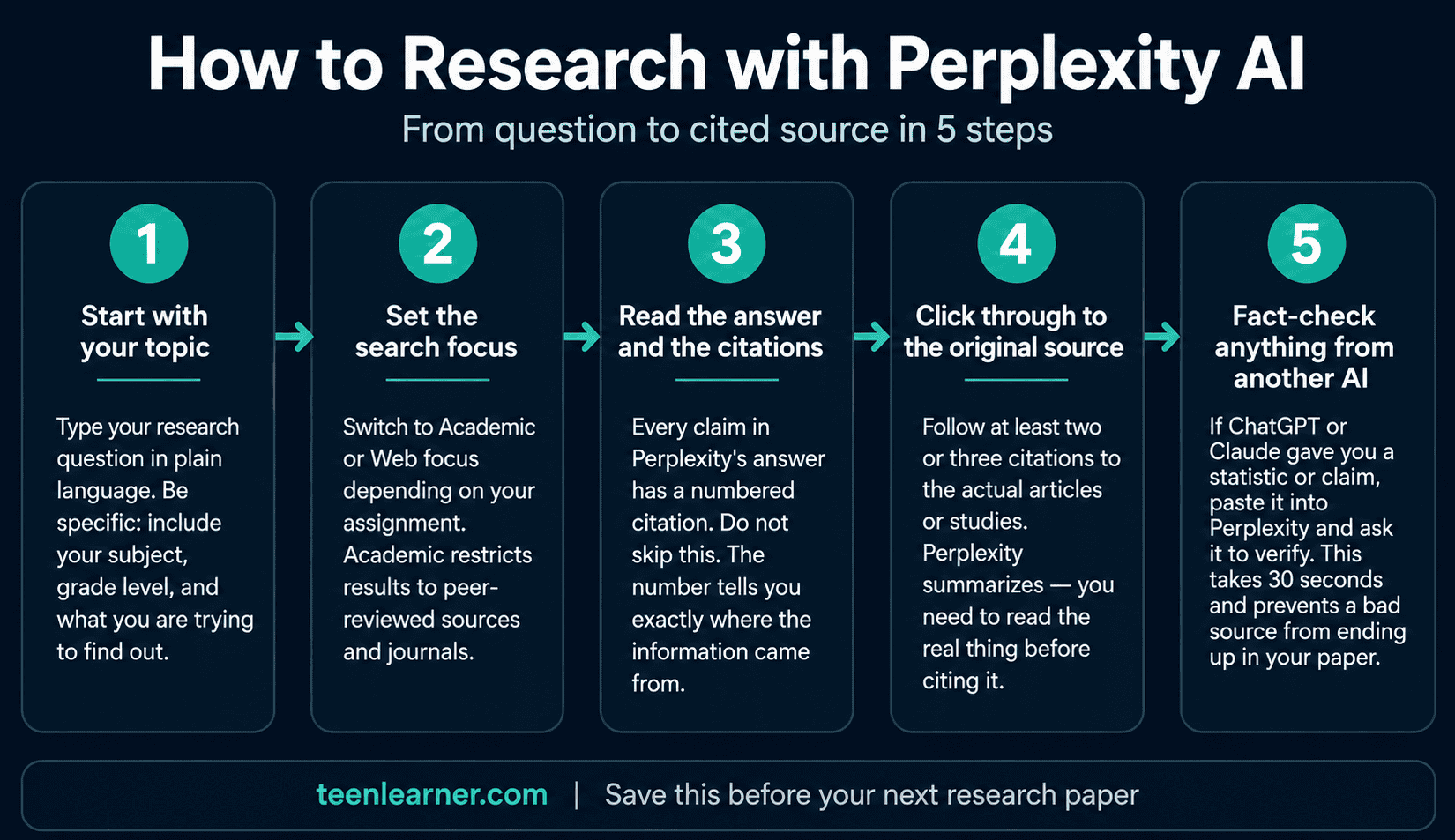
This is where Perplexity has no competition. When you are writing a research paper and need real sources, Perplexity finds them, reads them, and gives you an answer with citations attached. You do not have to trust that the information is accurate because you can verify it yourself in one click.
The workflow that works best: use Perplexity to identify what the sources say, then go read the original sources before you cite them. Perplexity gets you to the right information fast. The actual reading and understanding is still your job.
Finding sources for a research paper:
“What does current research say about [topic]? I need peer-reviewed sources published after 2020. Summarize the main findings and cite each one.”
Verifying a fact you already found:
“Is it true that [claim]? What do reliable sources say about this? Include citations.”
Getting a fast overview before you dive in:
“Give me a brief overview of [topic] for a high school student. Cover the main points and cite the most relevant sources so I know where to read more.”
One of Perplexity’s strongest features is the ability to filter searches to academic sources. When you need peer-reviewed material rather than general web results, you can set the search focus to academic journals and repositories. This matters for any assignment where your teacher requires credible sources.
For School: Fact-Checking Before You Submit
The single most underused student workflow is fact-checking your own work before you hand it in. If you used ChatGPT or Claude to help with an assignment, run your key facts through Perplexity before submitting. It will tell you quickly whether the information holds up.
This is not about distrust. It is about the reality that AI tools hallucinate, which means they sometimes produce confident, plausible-sounding information that is simply wrong. Perplexity grounds every answer in live web sources, which makes it far less likely to invent a statistic or misquote a study.
Checking a stat or fact you are about to use:
“Is [specific claim or statistic] accurate? What do reliable sources say? Show me citations.”
Checking whether a study actually exists:
“I was told there is a study by [researcher or organization] that found [claim]. Does this study exist? Can you find the original source?”
Getting a second opinion on something ChatGPT told you:
“ChatGPT told me [claim]. Is this accurate? What do current sources say?”
Before using any of these for an assignment, check your school’s AI policy. TeenLearner’s guide on how to use AI for school without cheating covers what is and is not acceptable use.
For Current Events: What’s Happening Right Now
Perplexity searches the live web by default for every query. This makes it the right tool for anything time-sensitive: current events, recent news, prices, sports results, what happened this week in any topic you are studying.
ChatGPT and Claude have training cutoffs and may answer questions about current events from outdated information unless you specifically tell them to search. With Perplexity, live web search is not an option you turn on. It is how the tool works by default.
Finding out what is happening with a current topic:
“What is the current situation with [topic]? Give me a summary of the most recent developments with sources.”
Researching something for a current events assignment:
“Summarize the key events and perspectives on [issue] from the past three months. Include citations from reliable news sources.”
Looking up something quickly before class:
“What is [term or concept] and why is it relevant right now? Keep it under 200 words.”
For any assignment that involves news, current events, or recent data, Perplexity is the tool that will give you the most accurate and up-to-date information available.
Perplexity Vs ChatGPT Vs Claude Vs Gemini Vs Copilot: The Full Comparison
These five tools are not competing to do the same thing. They are genuinely better at different tasks, and the students who understand that use whichever one fits.
Use Perplexity when:
You need sources. You are researching a topic and need to verify facts. You are writing a paper and need citations. You want to know what is happening right now. You are fact-checking something another AI told you.
Use Claude when (18+ only):
You need honest feedback on your writing. You are working through a complex document. You want a tool that will push back on weak arguments and teach you what to fix. For a full breakdown, see the TeenLearner Claude guide for teens.
Use ChatGPT when:
You need math help, image generation, or fast structured outputs. You want study prompts, a quiz, or a practice test. For a full breakdown, see the TeenLearner ChatGPT guide for teens.
Use Gemini when:
You want an AI that is already built into your phone, your Google Search results, and Gmail, not something you have to open on purpose. For a full breakdown, see the TeenLearner Gemini guide for teens.
Use Copilot when:
You are on a Windows PC and want an assistant already sitting in your taskbar, with the most detailed parental controls of any tool covered on this site. For a full breakdown, see the TeenLearner Copilot guide for teens.
And when the job is studying only from your own uploaded notes with nothing else mixed in, that is a sixth, more specific tool. See the TeenLearner Gemini Notebook guide for teens for that one.
The cleanest way to think about it: Perplexity finds and verifies. Claude (18+) thinks and writes. ChatGPT does and outputs. Gemini and Copilot are whichever one is already built into the device in front of you. A student who knows when to use each one has a significant advantage over a student who only knows one.
Where Perplexity Falls Short
Perplexity is the best research tool available to students right now, but it is not the right tool for every task.
It is not a writing tool. Perplexity is designed to find and summarize information, not to help you draft an essay, give you feedback on your argument, or explain a concept through a back-and-forth conversation. For writing help, use ChatGPT, or Claude if you’re 18+.
It is not a tutor. If you want something to explain a concept step by step, quiz you on material, or adapt to your level as you learn, ChatGPT (or Claude, at 18+) will serve you better. Perplexity answers questions; it does not teach.
Citations are a starting point, not a finish line. Perplexity cites its sources, but that does not mean every source it finds is appropriate for your assignment. A citation to a blog post is not the same as a citation to a peer-reviewed study. Always evaluate the quality of the source, not just the fact that a source exists.
It can over-summarize. For complex topics, Perplexity sometimes flattens nuance in favour of a clean answer. If you need a full picture of a contested topic, read the original sources rather than relying on the summary alone.
The One Feature Worth Knowing: Spaces
Spaces are Perplexity’s equivalent of Claude’s Projects. A Space is a persistent research environment where you can upload documents, set custom instructions, and keep all your research for one topic organized in the same place. Perplexity renamed Spaces to Projects in July 2026, and existing Spaces moved over automatically.
For a research paper, this looks like: create a Space, upload your assignment rubric and any sources you have already found, set an instruction like “Focus on peer-reviewed sources. My paper argues [your thesis]. Keep all search results relevant to this argument.” Every search you run inside that Space builds on the context you set up.
Spaces also support collaboration. You can invite a classmate to the same Space, which means you can share a research environment for a group project. The official Perplexity Spaces guide for students walks through setup in detail. Spaces require Perplexity Pro.
Your Starting Point
Perplexity is the tool that closes the biggest gap in how most students use AI: they generate content without verifying it. Perplexity does the verification by default, on every answer, every time.
Start with the simplest use. The next time you are about to use a statistic in an essay, run it through Perplexity first. Ask it to confirm the claim and show you the source. That one habit will make every piece of research you do more reliable.
The students who use AI well in 2026 are not the ones who use it the most. They are the ones who use the right tool for the right job. Perplexity is the right tool when the job is finding something true.
Frequently Asked Questions
Is Perplexity free for teens?
Yes. The free plan at perplexity.ai has no expiry and requires no credit card. It includes unlimited standard searches with cited sources, which covers most student research, fact-checking, and current events needs. You get a limited number of Pro searches per day on the free plan. Perplexity Pro is a paid plan (see Perplexity’s pricing page for the current price) that removes those limits and adds more features for organizing research projects.
How is Perplexity different from just using Google?
Google returns a list of links and you have to read each one yourself to find the answer. Perplexity reads those sources for you, synthesizes the key information, and gives you a direct answer with numbered citations attached to every claim. The citations link directly to the original sources so you can verify anything instantly. For research tasks, that is a significant time saving compared to searching manually.
Can I use Perplexity for a school assignment?
For research and fact-checking, yes, in most cases. Perplexity is particularly well suited to finding credible sources, verifying claims, and summarizing current information with citations you can trace back to the original. Always check your school’s specific AI policy before using any AI tool for assignments, as rules vary by class and institution. TeenLearner’s guide on how to use AI for school without cheating covers what responsible AI use looks like.
Is Perplexity safe for teens?
Perplexity has no teen-specific safety mode or parental controls, and in September 2026 Common Sense Media rated it an “unacceptable risk” for kids after test accounts registered as 15-year-olds were treated like adults. If you use it, never share personal details and check every source it cites. Parents can read our parent’s guide to teens and AI.
This article is for informational purposes only. Perplexity and AI tools change frequently. Features, pricing, and policies described here reflect what is available as of August 2026 and may have changed. Always check perplexity.ai for the most current information.
Want more practical guides on AI, money, and the skills that actually matter? Subscribe to the TeenLearner newsletter and get one lesson delivered to your inbox each week.